
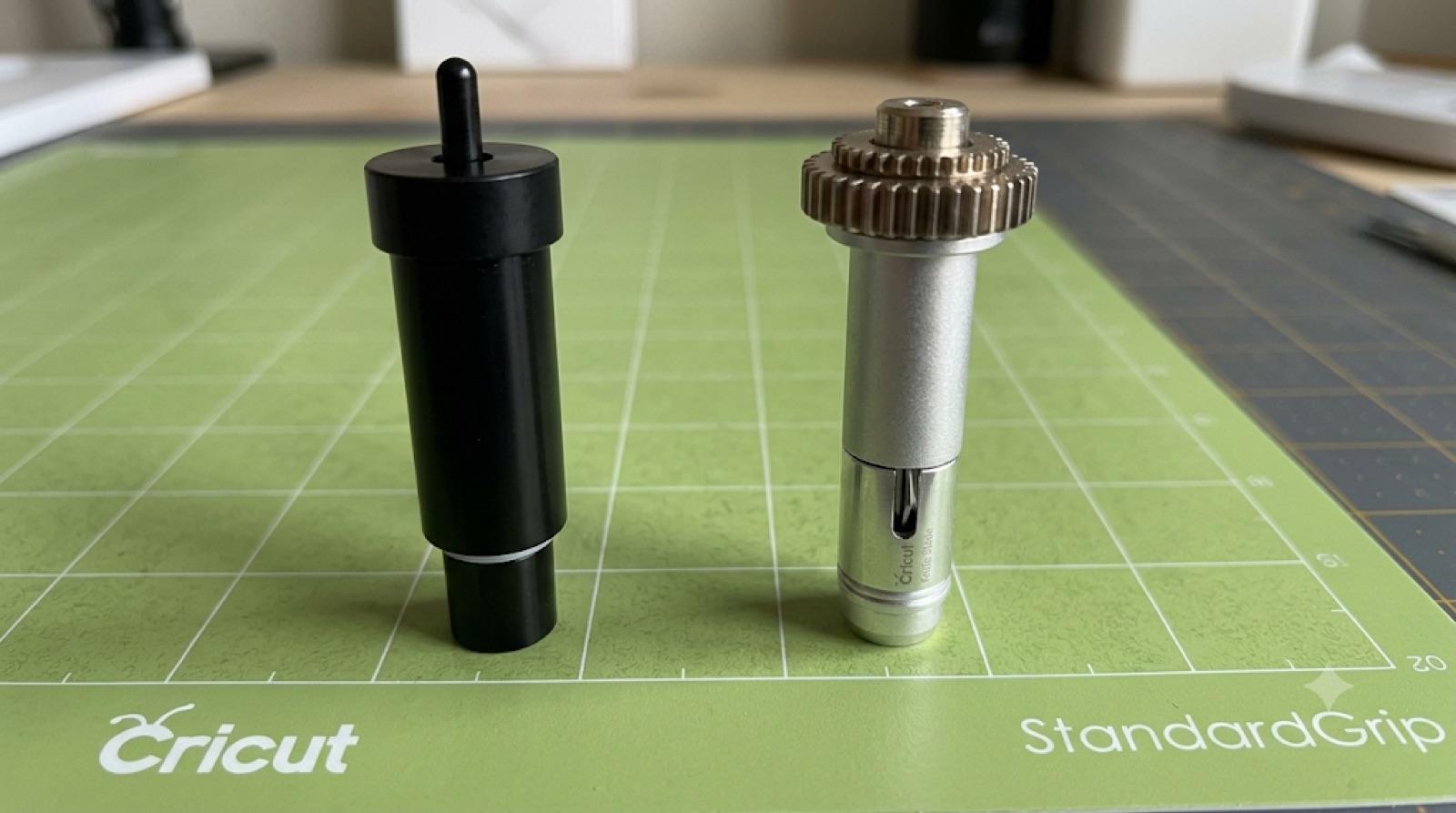
Cricut Knife Blade vs. Deep Point Blade: Which to Use
Deep Point cuts materials up to 1.5mm thick at a 60-degree angle and works on both Explore and Maker machines. It's built for thick cardstock, foam sheets, and poster board. The Knife Blade cuts up to 2.4mm but only runs on the Maker, and it's meant for dense materials like balsa wood, leather, and chipboard. If your material is thicker than 1.5mm or your Deep Point keeps stalling, you need the Knife Blade instead.
You've got a project calling for something thicker than cardstock, and you're staring at two blades that both claim to handle "thick materials." Grab the wrong one and you'll either watch your Deep Point struggle through a cut it was never built for, or spend twenty minutes calibrating a Knife Blade you didn't actually need. Here's how to tell which blade your project actually calls for.
What the Deep-Point Blade Actually Cuts
The Deep-Point Blade has a black housing and a 60-degree cutting angle, steeper than the 45-degree Fine-Point Blade that comes standard on every machine. That steeper angle is what lets it push through material the Fine-Point can't.
It works on both Explore and Maker machines, no special setup required. Swap it into Clamp B and you're cutting.
Materials it handles well:
- Thick cardstock (65 lb and heavier)
- Poster board
- Foam sheets
- Magnet sheets
- Stiffened felt
- Thin chipboard (under 1.5mm)
Deep Point tops out around 1.5mm thick. Past that, it starts tearing instead of cutting cleanly, or Design Space keeps asking for more passes without actually improving the result.
What the Knife Blade Actually Cuts
The Knife Blade only works on the Cricut Maker line (Maker, Maker 3, Maker 4). It's part of the Adaptive Tool System, and unlike every other blade, it requires calibration through Design Space before its first use. Skip that step and it won't seat correctly.
Once it's calibrated, it cuts up to 2.4mm thick, roughly 60% deeper than Deep Point.
Materials it handles well:
- Balsa wood and basswood, up to 3/32"
- Tooling leather (up to 7 oz.)
- Garment leather (up to 5 oz.)
- 2mm Cricut chipboard
- Matboard, 2-ply or 4-ply
- Craft foam up to 3mm
It's slower than Deep Point on purpose. Thick materials need multiple passes, and the machine paces itself to avoid tearing through dense wood or leather. You'll also want a StrongGrip mat, a standard mat won't hold thick material flat through repeated passes.
Knife Blade vs. Deep-Point Blade at a Glance
| Deep-Point Blade | Knife Blade | |
|---|---|---|
| Machine | Explore and Maker | Maker only |
| Max thickness | 1.5mm | 2.4mm |
| Cutting angle | 60 degrees | N/A (adaptive system) |
| Typical materials | Cardstock, foam, poster board | Balsa, leather, chipboard, matboard |
| Mat needed | StrongGrip for thick materials | StrongGrip required |
| Setup | Drop-in, no calibration | Requires Design Space calibration |
| Housing color | Black | Silver |
If your material's listed thickness falls under 1.5mm, Deep Point handles it, and it's the faster option since there's no calibration step. Past 1.5mm, or for anything Cricut has specifically qualified as a Knife Blade material, don't fight it with Deep Point. It won't get cleaner with more passes.
For a full walkthrough of every blade Cricut makes, not just these two, the complete blade guide covers installation steps and replacement signs for the whole lineup.
Materials Where the Choice Gets Confusing
Most projects aren't ambiguous. Cardstock is Deep Point, balsa wood is Knife Blade, done. But a few materials sit right at the edge:
1.5mm to 2mm chipboard. Thin chipboard cuts fine on Deep Point. Once you're at Cricut's 2mm chipboard specifically, move to Knife Blade, it's the qualified material for that thickness.
Faux leather vs. genuine leather. Faux leather (really a vinyl-backed fabric) usually cuts on Fine-Point or Deep-Point depending on thickness. Genuine garment or tooling leather is a Knife Blade material, the fibers are too dense for Deep Point to push through cleanly.
Thick cardstock vs. thin matboard. These can look similar, but matboard has a rigid core that behaves more like chipboard than cardstock. If it's labeled matboard, treat it as a Knife Blade material even if it doesn't feel that thick.
When you're not sure which side of the line your specific material falls on, a scrap test cut costs two minutes and saves a ruined sheet.
How to Pick the Right Blade for Your Project
The Cut Settings Calculator is a fast way to check blade, pressure, and speed together once you know which material you're working with.
Where a Clean File Actually Matters
No blade fixes a bad file. A design with the wrong stroke weight or overly intricate detail will shatter on thin balsa or tear on soft leather no matter which blade you're running, the material is too fragile for the level of detail in the cut.
This is usually where people blame the blade when the real issue is the SVG. If your design keeps failing on thick or dense material even with the right blade installed, running it through CutMagic's SVG Fixer first cleans up stroke weights and path complexity so the file matches what the material can actually handle.
Even with the right blade and a clean file, thick or dense materials are less forgiving of small text and fine detail than paper or vinyl. Simplify intricate designs before you commit to a full sheet of leather or balsa.
FAQ
Can the Deep-Point Blade cut leather? It can handle thin faux leather, but genuine garment or tooling leather is a Knife Blade material. Deep Point will struggle and likely tear the fibers instead of cutting cleanly through them.
Does the Knife Blade work on the Cricut Explore? No. The Knife Blade is exclusive to the Maker line (Maker, Maker 3, Maker 4) because it depends on the Adaptive Tool System, which Explore machines don't have.
How do I know if my Deep-Point Blade is dull versus needing the Knife Blade instead? If cuts have been clean before and are suddenly tearing or requiring extra passes on the same material, the blade is likely dull. If the material itself is new, thicker, or on the Knife Blade's qualified list, it's a blade mismatch, not a dull one.
Take Away
Deep Point and Knife Blade aren't interchangeable, and forcing the wrong one through a project either wastes material or wastes time. Check your material's thickness, confirm your machine, and when you're near the boundary, run a scrap test before you commit your full sheet.